On this page
How to Download Videos from WeChat Articles
WeChat Official Account articles often contain embedded videos, but WeChat doesn't provide a direct download option. With the MeowLoad browser extension, you can automatically detect and download these videos.
Install MeowLoad Extension
If you haven't installed the extension yet, get it from the web store:
- Chrome: Chrome Web Store
- Edge: Edge Add-ons
For detailed installation steps, see Install MeowLoad Browser Extension.
Download Videos from Articles
-
Open the WeChat article link in your browser, e.g.:
https://mp.weixin.qq.com/s/v0OiILpavyPe4PDHaqf_KQ -
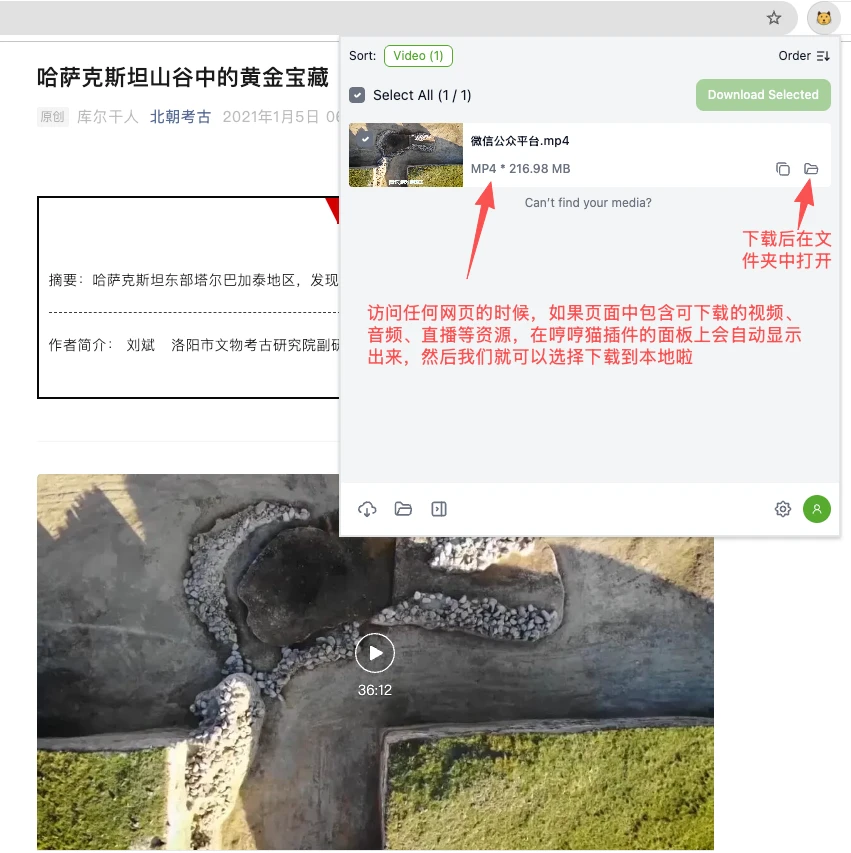
Once the page loads, the MeowLoad extension will automatically detect video resources. When the extension icon lights up, it means downloadable content has been found.
-
Click the MeowLoad icon to view the detected videos, select the one you want and download it. Click the folder icon to view the saved video.